Code Classroom Adds a Scratch-Based Blocks Editor for School Coding
- Published
- Author
- Mel Farrington
- Reads
- 930
Code Classroom now includes a Blocks editor based on open-source Scratch, putting drag-and-drop coding beside its Python and web editors in one free browser tool.
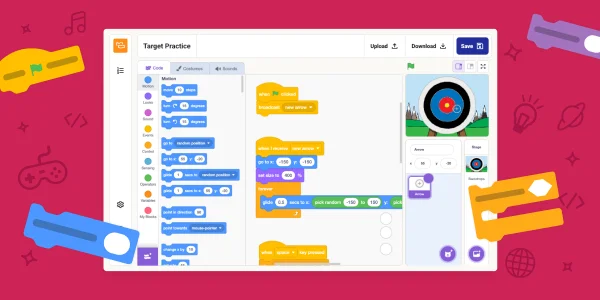
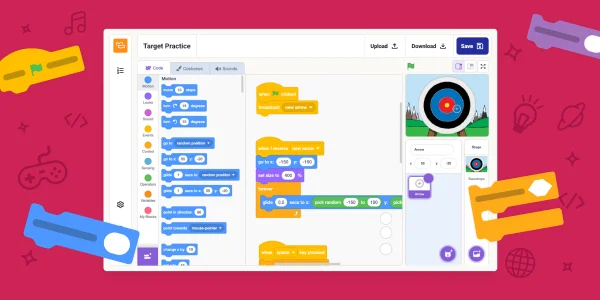
Code Classroom, formerly the Code Editor for Education, now has a Blocks editor. It's built on the open-source Scratch editor, which means teachers get a drag-and-drop environment that many younger learners already know, sitting alongside the Python and web tools the platform has offered until now. For schools that were running two or three separate coding tools, that's a real change in how a lesson can be structured.
Why a block editor sits beside a text editor
Block-based environments remove the syntax layer. A learner snaps together commands rather than typing them, so a missing colon or a misplaced bracket can't stop a program from running. That keeps attention on sequencing, loops, conditionals and events, which are the concepts that carry over into every text-based language later. Here's the thing, though: the same property that makes blocks approachable can make the jump to typed code feel abrupt if students never see the underlying structure.
Code Classroom's approach is to keep all of this in one place. Learners can start with the Blocks editor to build games, stories and animations, move to the Python editor as they gain confidence with typed programs, and use the web editor for HTML and CSS. Because the progression happens inside a single account and interface, a student doesn't need to relearn a new tool at each stage. That's the practical argument for the bundling, and it's a reasonable one.
What teachers are saying
Early feedback quoted in the announcement comes from two classroom teachers. A UK computer science teacher described the platform as "hugely transformative for schools," and pointed to the value of having "Python, HTML and CSS… all in one platform." Bartholomew Owuor, a computer science teacher at Cathsam School in Kenya, said that once the coding blocks were introduced he was able to widen his scope and include learners of many different ages. Mixed-age groups are a common headache for teachers planning a single scheme of work, so a shared environment that scales across ages is more useful than it might first appear.
These are individual testimonials, and they describe the experience of two educators rather than measured outcomes. Still, they point to the scenario the product is aimed at: one teacher, one tool, a wide spread of ability in the room.
Setup and administration
Code Classroom runs in the browser, and the announcement is explicit that there's no software to install and nothing for a school's IT team to manage. For schools with locked-down machines or limited technical support, that matters more than any single feature. A teacher can create classes, add students and start teaching without a deployment project.
The platform also integrates with Google Classroom. Existing classes can be imported in a few clicks, and Google single sign-on lets students log in with the accounts they already use. That reduces the duplicate account work that often eats into the first week of a term. If your school runs on Google Workspace for Education, this is the detail to check first, since it removes most of the setup friction.
Built-in class management covers creating classes, assigning work and tracking learner progress in one place. The announcement describes the platform as private by default, with a secure environment designed around school requirements. It also states that Code Classroom is free to use, with no hidden costs or subscriptions. Schools should still read the current terms and data arrangements on the sign-up page before committing, since those details sit outside the announcement itself.
Who gets access, and through what
The Blocks editor is available across Code Classroom, and the company says all Code Classroom features, including Blocks, are also available through Experience CS. Teachers already using Code Classroom for Python and web development, which the announcement says more than 4500 schools do, don't need a separate product to add block-based lessons. They can introduce Blocks into an existing class and keep the same progress tracking.
The obvious thing to watch is how the block-to-text transition works in practice. Scratch-style projects and Python programs are different artefacts, and a student's Blocks work won't automatically become Python code. The strongest use of the bundle will probably be deliberate bridging activities, where learners describe a block program's logic and then reproduce the same sequence in the Python editor. That's a teaching decision, not a platform feature, and it's worth planning before the first lesson.
If you want to try it, the sign-up link below takes you to the school account page. Set up one test class before rolling it out, check how the Google Classroom import handles your existing rosters, and confirm the sign-in flow works for students on the devices you actually have in the room. That's where most first-term problems show up, and they're cheap to fix before the timetable starts.